> [!abstract] Summary
> Arnold's **Standard Hair** shader is the recommended solution for rendering hair and fur. Use curves in **ribbon mode**. Color is best driven by the **melanin** controls rather than a direct color input. For light-colored hair, increase specular samples to reduce noise.
---
# Standard Hair
## Curve Mode
> [!tip] When rendering hair, use curves in **ribbon** mode for best results with the Standard Hair shader.
---
## Color: Melanin vs Texture
There are two ways to control hair color:
### Option 1 — Melanin
Leave `base_color` as pure white and use the **melanin** controls instead. Melanin simulates physical light absorption inside the hair fiber and produces more realistic results than a flat color input.
> [!note] Base color controls light **absorption** inside the fiber, which is what gives hair its appearance. Driving it directly with a texture bypasses the physical model — use melanin for realism.
### Option 2 — Texture
- Set `melanin` to `0`
- Connect your texture directly to `base_color`
- Use a **ramp on V** to blend from root to tip color
---
## Melanin Randomize
Adds per-strand variation to the melanin value, producing more natural-looking hair with slight color differences between strands.
![[file-20250126174214473.png|625]]
---
## Roughness
Controls the overall glossiness of the hair. Lower values produce shinier, more specular hair; higher values produce a more diffuse, matte look.
![[file-20250126174246881.png|625]]
---
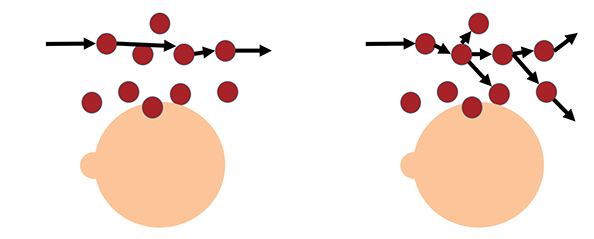
## Azimuthal Roughness
> [!note] Only active when **Anisotropic Roughness** is enabled.
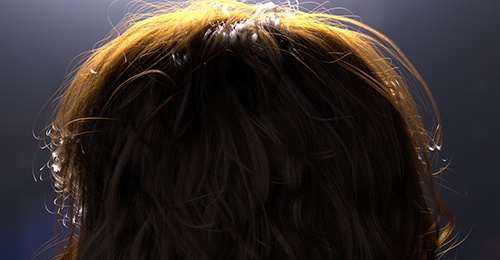
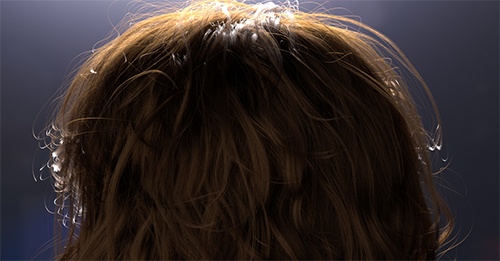
Controls how rays travel laterally inside the hair shaft. A lower value lets rays pass straight through (sharper highlights), while a higher value scatters them more (softer, broader response). Intensity decreases as azimuthal roughness increases.
| 0.2 (default) | 1.0 |
|---|---|
|||
---
## Shift
Tilts the hair cuticle angle. For realistic **human hair**, use a small angle between **0° and 10°**.
![[file-20250126174535406.png]]
---
## Specular Tint
Specular tint parameters act as **multipliers** on the specular color — they do not add color, they tint the existing specular response.
---
## Diffuse
Standard Hair has no significant diffuse component by design, as real hair appearance is dominated by specular interactions. However, adding a small amount of diffuse can simulate **damaged or dry hair**.
---
## Rendering Tips
> [!warning] Light-colored hair (blonde, white, grey) produces significantly more specular energy and will be noisier. Increase **specular samples** specifically for these cases.
![[file-20250126173929338.png]]
- For light-colored hair: increase specular samples in the Arnold render settings
- Use [[RaySwitch]] to assign a cheaper shader to indirect rays if hair is in the background or has many bounces
- Ribbon curves generally give cleaner AA on hair strands than tube curves