> [!abstract] Summary
> Reference guide for **PBR shading** using Arnold `standard_surface`. Covers every lobe of the uber-shader (diffuse, specular, metal, transmission, SSS, coat, sheen, emission), the difference between bump / normal / displacement, and a practical lookdev checklist to build a material the right way.
---
# Part 1 — Theory
## Overview
- We assign materials to objects.
- To simulate realism we use **PBR** (Physically Based Rendering/Shading) — as opposed to toon shaders.
- PBR relies on real-world physical principles: **energy conservation**, **Fresnel reflectance**, **microfacet distribution**, and a **linear color workflow**.
> [!info] Shader of reference
> In Arnold, assign a **`standard_surface`** shader (not the legacy `standard`). It is an uber-shader handling diffuse, specular, metal, transmission, SSS, coat, sheen and emission in a single layered node.
---
# Part 2 — Shading Lobes
## Color and Spec
### Diffuse (Albedo)
- **Diffuse = Albedo** — the base color of an object before it is affected by lighting.
- Author albedo maps, not baked-light textures.
![[takavach-rafizadeh-renders-albedo-final-f.jpg]]
![[takavach-rafizadeh-albedo.jpg]]
### Specular
| Parameter | Meaning |
| --- | --- |
| **Specular color** | Color of the light reflected off the surface |
| **Specular roughness** | 0 = mirror-smooth (calm water), 1 = fully diffuse/blurred reflection |
![[Heart_of_the_City_water_feature_Sheffield_-_geograph.org.uk_-_618552.jpg]]
### Dielectric vs Conductor
- Most materials are **dielectric** (non-conductive).
- Metals are **conductors** — handled via the Metalness lobe.
### Metalness
- Defines the areas where reflection is so intense that the surface behaves as a metal (tinted specular, no diffuse).
### IOR — Index of Refraction
Determines how light bends when passing between media. Higher IOR → more bending and stronger Fresnel at grazing angles.
| Medium | IOR |
| --- | --- |
| Air | 1.0003 |
| Ice | 1.31 |
| Water | 1.33 |
| Alcohol | 1.329 |
| Glass | 1.5 |
| Sapphire | 1.77 |
| Diamond | 2.42 |
> [!tip] Dielectric IORs typically sit between **1.3 and 1.8**. Values above 2.0 are rare outside of gemstones.
![[fresnel-ior_reflection-glossiness-matrix-1024x598.jpg]]
### Anisotropy
- **Isotropic** = light scattered uniformly in all directions.
- **Anisotropic** = light scattered non-uniformly, driven by the micro-structure of the surface.
- Examples: brushed metal, silk, velvet, hair, vinyl records.
![[file-20240902211919111.png]]
- **Rotation** = rotation angle of the anisotropy direction, usually driven by a tangent map or UV direction.
![[file-20240902212303312.png]]
---
## Relief
### Bump
- Fakes depth using a **grayscale map** — white = raised, black = recessed, 0.5 gray = neutral.
![[bump-map-normal-map-768x377.webp|400]]
### Normal
- Fakes depth using an **RGB map** — encodes the perturbed normal vector in tangent space. Blue = Z (up), Red = X, Green = Y.
![[normal-map-of-a-ten-pence-coin-300x296.jpg|250]]
### Normal vs Bump
| Criteria | Normal | Bump |
| --- | --- | --- |
| Precision | High | Approximation |
| File weight | RGB 16-bit (heavier) | Single channel (lighter) |
| Recommended for | Mid-frequency detail | High-frequency detail (micro-scratches, pores) |
> [!important] If using only one, choose **normal**. You can stack them: normal for mid-frequency + bump for high-frequency.
> For actual geometric elevation, use **displacement**.
---
## Displacement
- Actually moves geometry at render time without adding polygons in the viewport.
- Elevation map, evaluated at tessellation time.
- Heavier to render (requires subdivision + tessellation).
- Use for **low/base-frequency** silhouette changes — not for fine details.
- **Mid value**: 0.5 for signed displacement, 0 for unsigned (with a height multiplier).
> [!tip] Always enable **auto-bump** in Arnold to recover sub-tessellation detail as bump.
![[bump-mapping-comparison-to-real-geometry.webp]]
![[different-texture-maps-guide.jpg]]
---
## Subsurface (SSS)
- Simulates how light penetrates the interior of a translucent material (light passes through but diffusely — you can't see clearly through it).
- Typical examples: **skin, wax, marble, milk, leaves, jade**.
- Very expensive to compute.
![[ac-standard-subsurface-image2014-3-7-8-37-44-7.png|300]]
![[ac-standard-subsurface-dragon-sss-randomwalk-v2-500-5.jpg|300]]
| Radius | Result |
| --- | --- |
| 0 | ![[ac-standard-subsurface-1-emily-radius-0-32.jpg\|250]] |
| 1 | ![[ac-standard-subsurface-4-emily-radius-1-34.jpg\|250]] |
### Radius
- Approximate distance up to which light can scatter below the surface.
- Practical take: treat the color as transparency per wavelength. For skin, `1.0, 0.35, 0.2` → red wavelengths scatter deepest, green/blue bounce back closer to the surface — this is why skin has a reddish shadow terminator.
### Scale
- Multiplies `sss_radius_color`. Tune scattering depth without re-authoring the color.
### Type
| Type | Behavior |
| --- | --- |
| **Diffusion** | Cheap, dipole/normalized diffusion approximation |
| **Randomwalk** (default) | Physically accurate, random path tracing inside the volume |
| **Randomwalk V2** | More expensive, more accurate, better with thin geometry and anisotropic scattering |
---
## Glass (Transmission)
- Very expensive.
- Directly tied to sampling and **transmission depth** in the render settings.
### Depth
- Higher value → thinner apparent volume, less scatter of rays inside.
- Useful to match the transmission color when the model is too thin.
![[file-20240903174125083.png]]
### Scatter
- For **thick liquids** (honey, murky water, soapy substances).
> [!warning] The **Opaque** attribute must be **disabled** on the geometry for transmission/scatter to work correctly.
![[file-20240903174345816.png|925]]
### Dispersion (Abbe)
- How much the IOR varies across wavelengths.
- Creates the rainbow/diamond effect (chromatic aberration at refraction).
- Glass: ~10 minimum; Diamond: ~55. **Lower Abbe = stronger dispersion.**
![[file-20240903174736545.png]]
### Dielectric Priority
- Which material dominates when two surfaces overlap.
- Typical case: a glass of water. Water and glass are both dielectric — Arnold needs to know which dominates at the interface. **Higher priority wins.**
### Specular IOR with Transmission
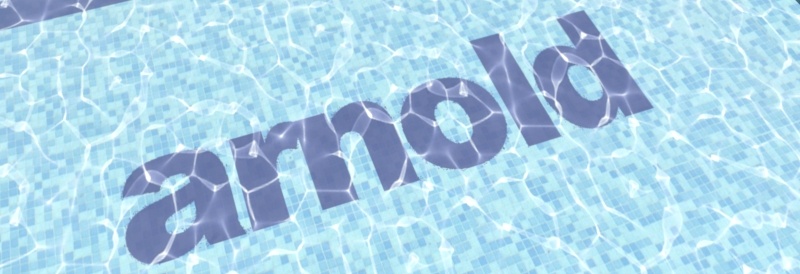
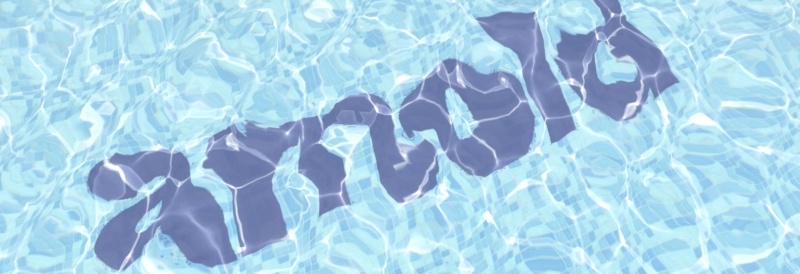
- Default 1.0 = vacuum (no refraction). `standard_surface` assumes outward-facing normals, geometry embedded in air (IOR 1.0), and no overlapping surfaces.
![[file-20240902211443937.png]]
| IOR 1.0 | IOR 1.5 |
| --- | --- |
|  |  |
### Going Further — Beer-Lambert Law
- Describes how light is absorbed by a medium as a function of absorber concentration and path length.
- Practical use: thicker glass/liquid appears more saturated because light travels a longer distance through the medium before reaching the camera.
---
## Metal
![[image-20250301 1.png]]
- Metals have **no diffuse component** — base color tints the specular reflection directly.
- Use **measured F0 values** (base color at 0°) and **F82 / edge tint** when available (complex IOR workflow).
| Metal | F0 (linear RGB) |
| --- | --- |
| Gold | `1.00, 0.71, 0.29` |
| Silver | `0.95, 0.93, 0.88` |
| Copper | `0.95, 0.64, 0.54` |
| Aluminum | `0.91, 0.92, 0.92` |
| Iron | `0.56, 0.57, 0.58` |
> [!tip] Roughness drives the visual identity of a metal far more than its base color (polished vs brushed vs oxidized).
---
## Coat
- Simulates a thin transparent layer on top of the base: **clear coat, car paint varnish, wet skin, lacquered wood**.
- Has its own IOR, roughness, and normal (often a smoother normal than the base).
- Absorbs energy from the layers below (energy conservation).
## Sheen
- Simulates **retro-reflection at grazing angles** on microfiber surfaces.
- Use for: fabric (velvet, cotton, satin), dust layers, peach fuzz on skin.
- Acts as an additional lobe — does **not** replace diffuse.
## Emission
- Makes the surface **self-illuminate**.
- Driven by color × weight (unbounded — can exceed 1 for true light emission).
- Emissive geometry contributes to lighting only if Arnold's **Light Sampling** is enabled on the mesh. Otherwise it is just a bright surface.
## Opacity vs Transmission
| | Opacity | Transmission |
| ------- | ---------------------------------- | ----------------------------------- |
| Type | Binary / alpha cutout | Physically correct glass/refraction |
| Cost | Cheap (depend on render engine) | Expensive |
| Use for | Leaves, hair cards, fences, decals | Solid transparent objects |
| | | |
> [!warning] Never mix both on the same surface unless you know what you are doing.
---
# Part 3 — Practical Lookdev Checklist
1. Start from a **gray clay** shader with correct roughness — validate silhouette and lighting first.
2. Plug **albedo** → validate base color under neutral light (gray HDRI or 18% gray backdrop).
3. Plug **roughness** → validate specular behavior.
4. Plug **normal/bump** → validate surface detail.
5. Plug **displacement** last → most expensive, requires tessellation tweaks.
6. Add **SSS / coat / sheen** only where physically justified.
7. Always lookdev under **at least two lighting conditions** (studio HDRI + production HDRI).
8. Check albedo values stay within the **PBR safe range** (sRGB 30–240 — no pure black, no pure white).
---
# Part 4 — Going Further
## Metals: MTL vs SPEC workflow
```embed
title: "Metallic Magic"
image: "https://miro.medium.com/v2/resize:fit:1200/1*yvVQ8HRMUiWyqFZ3E_nSDQ.jpeg"
description: "Metalness Maps and Workflow Explained"
url: "https://medium.com/gametextures/metallic-magic-2dce9001fe15#:~:text=A%20Metallic%2C%20or%20Metalness%2C%20map,and%20do%20not%20(black)."
```
## Useful References
- Arnold `standard_surface` documentation — Autodesk Help
- *Physically Based Rendering: From Theory to Implementation* — Pharr, Jakob, Humphreys
- Disney BRDF / Principled BSDF paper — Burley, 2012
- *Crafting a Next-Gen Material Pipeline for The Order: 1886* — David Neubelt & Matt Pettineo